

Cord Cutters
- Thread starter Wolf
- Start date
You are using an out of date browser. It may not display this or other websites correctly.
You should upgrade or use an alternative browser.
You should upgrade or use an alternative browser.


Before you sign up for that cheaper ad-supported Netflix plan, read this

 www.businessinsider.com
Netflix's plan with ads is cheaper, but it's missing hundreds of movies, new data shows
Movies like "Bullet Train" and "Uncharted," as well as TV shows like "The Walking Dead," are missing from the Netflix ad plan.
www.businessinsider.com


And another place they get you. Ads on a paid service!
HBO series like "Game of Thrones" will run with ads on HBO Max. As Warner Bros Discovery scrambles for new revenue, it's exploring a reversal of its earlier streaming strategy — a move that could be controversial to creators and people inside the company.
 www.businessinsider.com
HBO series like "Game of Thrones" will run with ads on HBO Max. As Warner Bros Discovery scrambles for new revenue, it's exploring a reversal of its earlier streaming strategy — a move that could be controversial to creators and people inside the company.
HBO series like 'Game of Thrones' will run with ads on HBO Max as Warner Bros Discovery scrambles for new revenue
WBD is looking to run ads on HBO originals like "House of the Dragon" when they stream on HBO Max, a move that could be controversial with Hollywood creators.
www.businessinsider.com
That'll piss me off if I'm paying for the subscription.
It's bad enough that there are already product placements for Starbucks.

It's bad enough that there are already product placements for Starbucks.

IndustrialH
"Not dead... just resting"

Finally got around to setting up my echo dot and connecting it to the TV. Once I did that the Vizio app started working and now I can use my pixel as a remote. This is nice cause my tv doesn't have a mic in the remote so typing out searches was annoying.

Update: I've been happy with my LG OLED TV and YouTube TV service. But after several trouble-free months, I began intermittently having problems being connected to Wi-Fi when turning on the TV. And often, it would require me to re-enter the Wi-Fi password, which is a pain to do with a remote. Plus it shouldn't be necessary. And it was getting worse and worse over time.
So I looked into the issue. The first thing I noticed is that the TV was seeing a marginal signal strength on the 5 GHz Wi-Fi band. This is because they put the Wi-Fi card (with internal antenna) on the bottom-left corner of the back of the TV (bottom-right when viewing from the front). See the picture
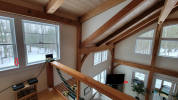
Now the arrow on the window sill is where the router was, but you can see I moved it. What's really frustrating is that my Amazon Fire TV stick would come out of the (nearer) other side of the TV; but regardless of position, the Fire stick has a much stronger antenna. We use the Fire stick on our bedroom TV, which is at the other end of the house and through a wall, and it works perfect every time.
However, when we use the Fire stick on this TV, it severely limits the picture settings, plus the LG's built-in menus are meant to work with the remote it comes with. If they just brought the LG antenna out externally, that would solve everything, because as it is, the TV panel blocks the wireless signal.
So anyway, I moved the router, and now the signal strength is good enough that I don't have to keep putting in the password. But I was still having the TV turn-on without being connected to our Wi-Fi. I did some online research, and found dozens of articles, chats, and posts, all about getting the TV to stay connected when turning on. While much of the advice was bullshit, I did come across a few super-geeks who had the answers.
Let's just say that the setup of this TV involves (easily) a hundred different settings. And I was instructed on how to change a multitude of these settings, so that I'd ultimately have the TV stay connected. I don't actually know which of the settings really fixed the problem, because of how long it takes to recreate the issue. All I know is that I tried several things that didn't work, and then when I found some really deep technical advice, I applied them all. Here are some of the things I did.
- Turned off all "auto" settings in the menus.
- Turned off all "quick" settings in the menus.
- Changed the country code from auto to US.
- Changed the time zone from auto to EST.
- Changed the DNS server address from 192.168.1.1 to 8.8.8.8.8.
- Changed my modem setting for the TV from guest to host (or something).
Somewhere in there, or in other settings I forgot about, I fixed the problem. I don't know how in hell a person without a technical background would ever resolve this.
So I looked into the issue. The first thing I noticed is that the TV was seeing a marginal signal strength on the 5 GHz Wi-Fi band. This is because they put the Wi-Fi card (with internal antenna) on the bottom-left corner of the back of the TV (bottom-right when viewing from the front). See the picture
Now the arrow on the window sill is where the router was, but you can see I moved it. What's really frustrating is that my Amazon Fire TV stick would come out of the (nearer) other side of the TV; but regardless of position, the Fire stick has a much stronger antenna. We use the Fire stick on our bedroom TV, which is at the other end of the house and through a wall, and it works perfect every time.
However, when we use the Fire stick on this TV, it severely limits the picture settings, plus the LG's built-in menus are meant to work with the remote it comes with. If they just brought the LG antenna out externally, that would solve everything, because as it is, the TV panel blocks the wireless signal.
So anyway, I moved the router, and now the signal strength is good enough that I don't have to keep putting in the password. But I was still having the TV turn-on without being connected to our Wi-Fi. I did some online research, and found dozens of articles, chats, and posts, all about getting the TV to stay connected when turning on. While much of the advice was bullshit, I did come across a few super-geeks who had the answers.
Let's just say that the setup of this TV involves (easily) a hundred different settings. And I was instructed on how to change a multitude of these settings, so that I'd ultimately have the TV stay connected. I don't actually know which of the settings really fixed the problem, because of how long it takes to recreate the issue. All I know is that I tried several things that didn't work, and then when I found some really deep technical advice, I applied them all. Here are some of the things I did.
- Turned off all "auto" settings in the menus.
- Turned off all "quick" settings in the menus.
- Changed the country code from auto to US.
- Changed the time zone from auto to EST.
- Changed the DNS server address from 192.168.1.1 to 8.8.8.8.8.
- Changed my modem setting for the TV from guest to host (or something).
Somewhere in there, or in other settings I forgot about, I fixed the problem. I don't know how in hell a person without a technical background would ever resolve this.
My understanding is that 5GHz is faster, but has a more narrow broadcast zone, whereas 2.4 is slower but reaches further. 2.4 might be enough if you have further 5 issues...?marginal signal strength on the 5 GHz Wi-Fi band.
DNS is getting the web destination name from the numbers, like a phone book for the internet. Like 603-222-9999 = Johnny Jones but it's 1.2.3.4 = Comcast (or whoever).Changed the DNS server address from 192.168.1.1 to 8.8.8.8.8.
8.8.8.8 is a Google-hosted DNS server. 192.168.1.1 is a non-routable (not on the internet, only on your local network) address. You were pulling DNS from whatever your local router was getting it from (probably your internet provider) but now you bypass that and go straight to Google for DNS names.

Not surprisingly, you are correct on both counts. Using Speedtest, I get around 60Mb/s with the 2.4GHz, but over 350MB/s with the 5GHz. So I figured the better speed would be important for the TV. In more remote places around the house, such as my Sirius streaming phone on my back porch, or in my basement, I use the 2.4.My understanding is that 5GHz is faster, but has a more narrow broadcast zone, whereas 2.4 is slower but reaches further. 2.4 might be enough if you have further 5 issues...?
DNS is getting the web destination name from the numbers, like a phone book for the internet. Like 603-222-9999 = Johnny Jones but it's 1.2.3.4 = Comcast (or whoever).
8.8.8.8 is a Google-hosted DNS server. 192.168.1.1 is a non-routable (not on the internet, only on your local network) address. You were pulling DNS from whatever your local router was getting it from (probably your internet provider) but now you bypass that and go straight to Google for DNS names.
Haha, I go nuts when I turn on the TV and it won't connect to wireless. That's when I question getting rid of cable.I get annoyed really easily when things don’t work. I felt some stress just reading that. But glad you got it working again.

IdRatherBeSkiing
Sherbert is NOT and NEVER WILL BE ice cream.
So I'm sure people have noticed this before me right now, but I love my Vizio TV. I have many posts about how awesome it is but the remote basically just has advertisements on it. Take a look at this.
Wtf is vudu or xumo? Never heard of them. And isn't Redbox that thing you see when you're leaving the grocery store?
So yeah it's nice to have Netflix, Hulu and prime as direct buttons on my remote. But then I have three buttons that are straight up useless ads. That kind of sucks.

Wtf is vudu or xumo? Never heard of them. And isn't Redbox that thing you see when you're leaving the grocery store?
So yeah it's nice to have Netflix, Hulu and prime as direct buttons on my remote. But then I have three buttons that are straight up useless ads. That kind of sucks.
Haha I haven't paid attention to those buttons since I got my TV. To watch regular network stuff, I have to select YouTube TV from the TV screen, and all the other apps are right there too.
My LG remote has buttons for Netflix, Prime, Disney +, and LG's HD channels. But I never use them.
My LG remote has buttons for Netflix, Prime, Disney +, and LG's HD channels. But I never use them.
In 5 years, it will be kinda like having shortcuts on your computer keyboard that open Netscape, Napster, RealPlayer and AOL Instant Messenger.


